
MeshCore is free software that turns a small, cheap LoRa radio into an off-grid text messenger. Pair it with your phone, and you can send messages across town or across the country with no mobile signal, no internet and no contract, passed along by repeaters that volunteers have put up on rooftops and masts. In the UK it has become the busiest system of its kind, with around 1,500 repeaters heard on the official map in a single week this November.
We moved our own setup near St Neots to MeshCore in November 2026. On the first evening, a hello from a £20 board was answered from Southport, about 150 miles away, after 16 hops. This guide covers how MeshCore works, how to find the MeshCore UK network near you, and how to get on it step by step.
If you’re new to LoRa radio itself, start with our primer, which explains what it can and can’t do and how MeshCore compares with Meshtastic.
Complete Guide
LoRa Radio Explained
LoRa radio sends messages miles with no phone signal, no internet, and no infrastructure. Plain-English guide to how it works, the free volunteer repeaters, and MeshCore vs Meshtastic.
Read the Full Guide: LoRa Radio Explained →
What Is MeshCore?
MeshCore is open-source firmware (the software that runs on the radio) plus a free app for your phone. It was created in 2024 by Scott Powell, and its official home is meshcore.io. The radio firmware is free. The MeshCore app is free to download and use for messaging, with an optional paid unlock for one feature that repeater owners use.
People use it for keeping in touch when the phones go down, for staying connected in places with no signal, and increasingly as a local community network: a group of neighbours, a village or a family spread across a county.
Like any LoRa system, it’s text only. No calls, no voice notes, no photos, and messages are short: the app allows 126 characters, a bit less than an old text message. Think of an old Nokia 3310 that works when everything else has stopped.
How MeshCore Works
A MeshCore network is made of three kinds of radio, all running the same hardware with different firmware:
- Companions are the radios people carry. Yours connects to the MeshCore app on your phone by Bluetooth. A companion sends and receives your messages, but it doesn’t pass on anyone else’s, which saves your battery and keeps the airwaves quiet.
- Repeaters are fixed radios, usually up high on a roof or a mast, that pass messages on. They’re the backbone of the network, and in the UK almost all of them are owned and paid for by volunteers.
- Room servers are like a noticeboard or an email server. They hold messages, so if you were out of range when something was posted, you get it when you come back.
When you send a message to someone for the first time, it spreads out through the repeaters until it finds them. MeshCore then remembers the route that worked, so later messages go straight along it instead of flooding the whole area. Direct messages show a tick when they’ve been delivered. A message can make up to 64 hops, although in real life a dozen or so is already a long way: our Southport reply took 16.
Your radio only tells the network it exists when you ask it to. Tapping Advert in the app announces your name and your radio’s address so other people and repeaters can find you. A zero-hop advert reaches only radios that hear you directly. A flood advert is passed on by every repeater that hears it.

🐔 Chicken Licken
Did You Know?
I’ve been saying it for years: you don’t need the internet to text someone 150 miles away. A hello sent from near St Neots got a reply from Southport, passed hand to hand through 16 volunteer radios. No mast, no cable, no server, no company. MeshCore will let a message make up to 64 of those hops. They told me it couldn’t be done. Turns out they just hadn’t asked a man with a roof.
The MeshCore UK Network
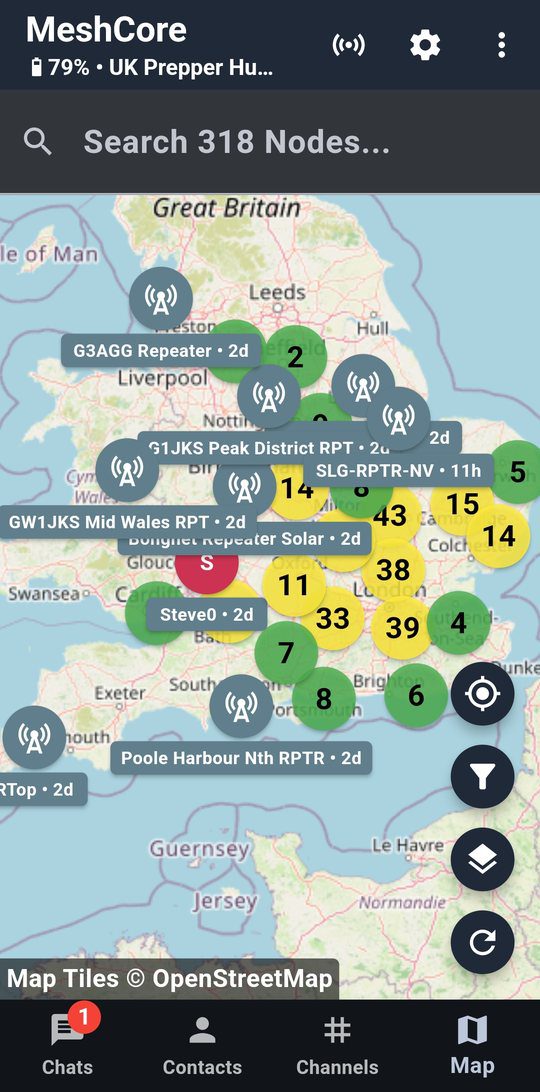
This is the reason we recommend MeshCore for most UK households: the repeaters are already there. The official map heard from about 1,500 UK repeaters in one week in November 2026 and nearly 2,000 in a month, with clusters around London and the big cities and repeaters as far apart as Cornwall, mid Wales and the north of Scotland. Those are only the owners who chose to put theirs on the map.
When we started using a MeshCore pocket radio, it filled its memory with the repeaters it could hear, and we had to tell it to overwrite the oldest ones. We never saw anything close to that on Meshtastic.
None of it costs anything to use. There’s no company, no subscription and no sign-up, and the network grows every time someone puts up another repeater.
Use the MeshCore Map to Find Repeaters Near You
Before you buy anything, check what’s around you on the official MeshCore map at map.meshcore.io. Zoom in on your home and look for repeaters within a mile or two, ideally more than one, and ideally somewhere high (a hill, a tall building, a mast). The closer and higher they are, the easier your little radio will find its way in.
The map only shows radios whose owners set a location, so a blank patch doesn’t always mean nobody is there. The MeshCore app has a map too, which shows the repeaters your own radio has actually heard. That’s the real test once you’re up and running.
Which Radio? MeshCore Devices for Beginners
MeshCore runs on dozens of LoRa radios. For a household, they fall into three groups:
- Ready-made pocket units. A sealed radio with its own battery, case and usually GPS, such as the Seeed SenseCAP T1000-E, a card-sized unit we use ourselves. Nothing to build, and the easiest choice for most people. Roughly £40 to £80.
- Bare boards. The Heltec V3 and similar boards cost about £20 but need a case, a battery and some care. Brilliant as a repeater. As a phone companion, the Heltec V3 is a poor pick: MeshCore’s own documentation warns its Bluetooth only reaches a few feet, so the phone keeps disconnecting.
- Radios with a screen and keyboard. Units like the LILYGO T-Deck let you send messages with no phone at all. Handy if you don’t want to rely on a phone battery.
Whatever you choose, buy the 868MHz version for the UK, and check it’s on the supported list in the MeshCore flasher before you order.
How to Set Up MeshCore, Step by Step
This takes about half an hour the first time. You’ll need your radio, a USB cable, a computer with the Chrome or Edge browser, and your phone.
1. Install the MeshCore App
The MeshCore app is free on Android and iPhone, and there are versions for Windows, Mac, Linux and a web browser too. Install it while you have internet. Once it’s on your phone, it works with no connection at all.
2. Put MeshCore on Your Radio with the MeshCore Flasher
Many radios arrive with other software on them. Plug yours into the computer, open the MeshCore flasher at meshcore.io/flasher in Chrome or Edge, pick your device from the list and choose the Companion firmware for Bluetooth. Then press flash and wait a minute or two.
If the radio has ever run Meshtastic, use the Erase Flash option first. We skipped that step on our T1000-E and it couldn’t save any settings: every time it restarted it forgot its name, its channels and its pairing. A full erase before flashing avoids all of that.
3. Pair Your Phone
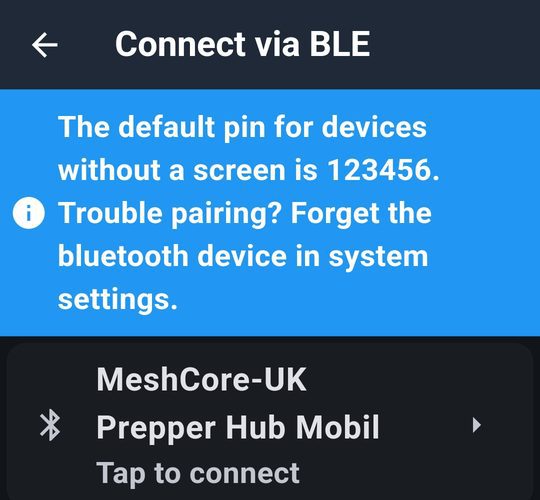
Open the MeshCore app and connect to your radio over Bluetooth from inside the app, not from your phone’s Bluetooth settings. Radios with a screen show the pairing PIN; ones without a screen usually use 123456 until you change it. Set your own PIN in the app straight away.
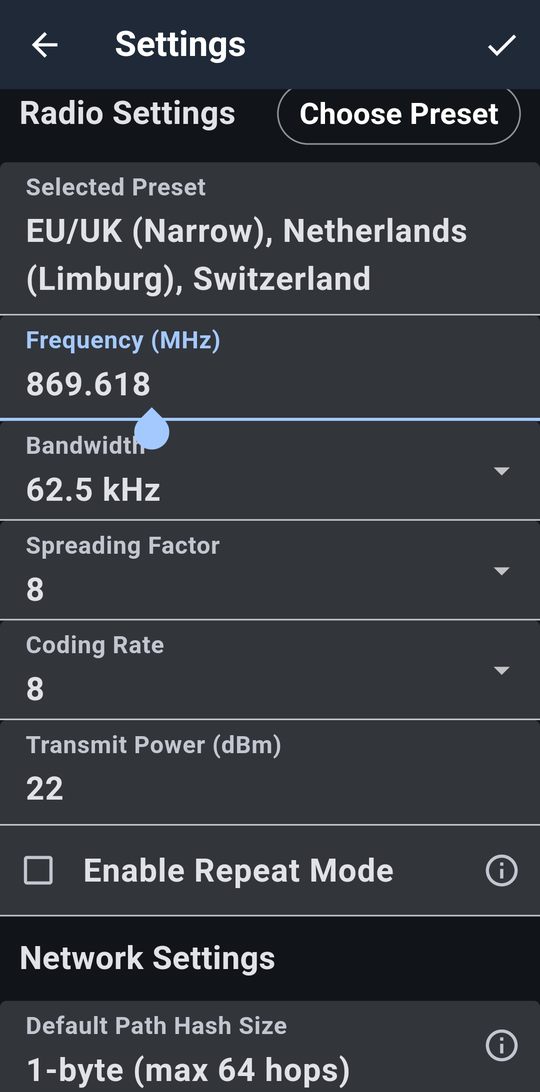
4. Choose the UK Radio Settings
In the app’s radio settings, tap Choose Preset and pick EU/UK (Narrow) (it’s listed alongside the Netherlands and Switzerland). That sets 869.618MHz with the narrow 62.5kHz bandwidth, which is what the UK network uses. Your radio has to match the repeaters around you exactly, or it won’t hear them. If your local network uses something different, the people running it will tell you.
5. Name Your Radio and Send an Advert
Give your radio a name. It’s public, so use a first name or a nickname, never your address. Then tap Advert and choose a flood advert, so repeaters and other users learn you exist.
6. Say Hello
Within a few minutes, the Contacts list should start filling up with repeaters and other people your radio has heard. Send a short hello on the Public channel. If someone answers, you’re on the network.
MeshCore Channels: Public, Hashtag and Private
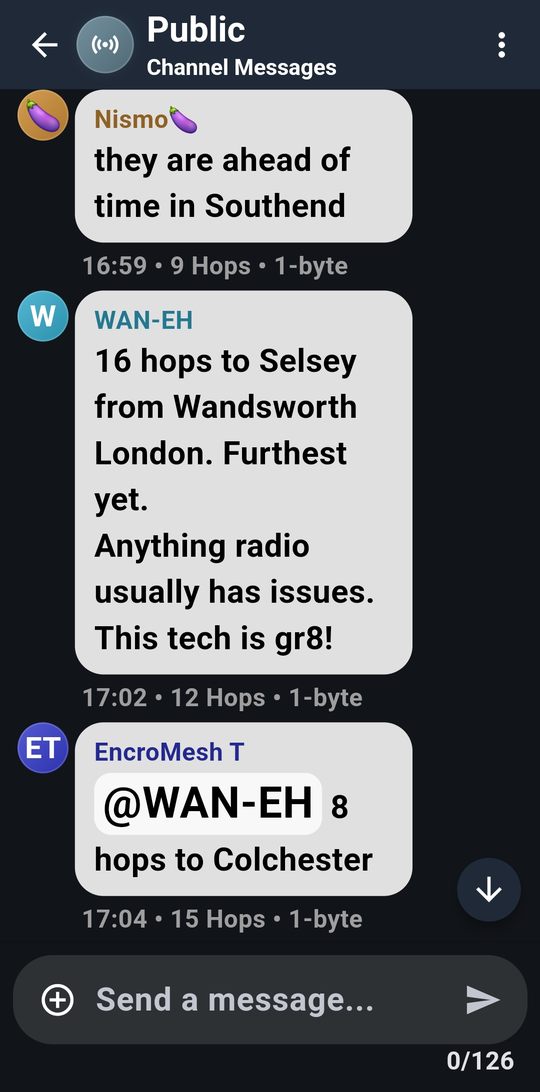
- Public is the channel everyone shares. Good for a hello and finding out who’s around. Anyone can read it.
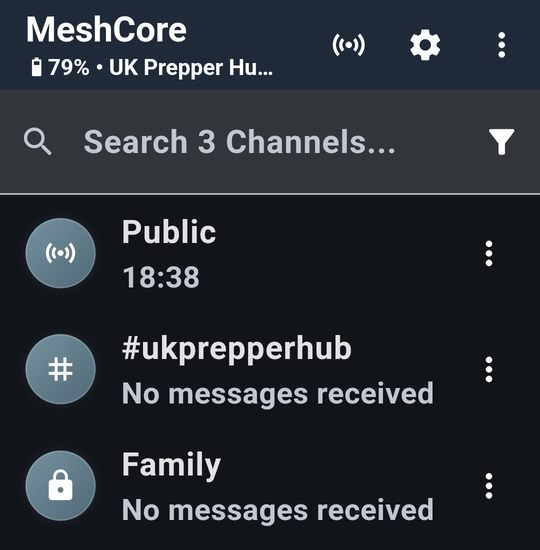
- Hashtag channels are open channels anyone can join by typing the same name, starting with #. They’re handy for a town, a club or a topic. We’re testing our own, #ukprepperhub: add it by name in the app and say hello, but be patient while it’s in testing. Like Public, anyone who adds the name can read it.
- Private channels use a random key that only the people you share it with have. Make one for your household, share it face to face (the app can show it as a QR code), and use it for anything personal.
You can also message one person directly. Direct messages are encrypted from end to end, and you get a tick when they arrive.
Should You Add a Repeater?
If the map shows nothing near you, or you’d like to give something back, a repeater is the single most useful thing you can add. It uses the same kind of radio with repeater firmware from the same MeshCore flasher. What matters is where you put it.
- Height beats everything. A loft, a chimney bracket or a pole above the roofline does far more than any amount of power.
- Power for a power cut. Put it on a battery with a small solar panel and it keeps the network going when the grid doesn’t.
- Set its location so it appears on the MeshCore map and others can find it.
- Talk to your neighbours on the air. Local repeater owners are usually glad to help with settings and placement.
You look after your repeater from the MeshCore app, over the radio, once it’s up. We’ll cover building and setting one up properly in a separate guide.

🦆 Keith
Don’t Be Keith
Keith put his new MeshCore repeater in the cellar, next to the tinned peaches, because that’s where the important kit goes and it would be safe from the weather. It was very safe. It heard nothing, reached nobody, and spent a fortnight relaying to the boiler. His wife carried it up to the loft hatch and it found eleven repeaters before the kettle boiled. Radios want height, not shelter.
Privacy on MeshCore
- Your radio’s name and address are public whenever you send an advert. Use a name that doesn’t give away where you live.
- Location sharing is optional. If you turn on sharing your position in adverts, it shows up on the public map. Share your location only on a private channel with people you trust.
- Public and hashtag channels can be read by anyone who adds them. Keep anything personal to direct messages and private channels.
MeshCore in a Power Cut
A companion radio runs on its own battery and needs no signal. meshcore.io says batteries can last over a week on a charge; in practice it depends on the radio and how you set it up, with GPS and location sharing the biggest drains. Your phone needs charging too, because it’s the screen and keyboard.
Keep both topped up from a power bank, and keep the radio somewhere you’ll find it in the dark. The repeaters that matter most in a long power cut are the ones on solar, which is why it’s worth knowing which ones near you are solar-powered and, if you can, adding one of your own.
INIU 20,000mAh 45W Power Bank
20,000mAh and 45W fast charging in a body 30% smaller than most, with a built-in USB-C cable that can’t go missing in a power cut.
Lessons We Learned Setting Up MeshCore
- Erase before switching from Meshtastic. Skipping it left our pocket radio unable to save anything.
- Pair inside the app, not in your phone’s settings. If a radio that used to connect suddenly won’t, remove it from your phone’s Bluetooth list and pair it again from the app.
- Match the local settings exactly. A radio on the wrong preset sits there hearing nothing and looks broken. It isn’t.
- Give it a few minutes. Contacts appear as repeaters and people send adverts, not all at once.
Frequently Asked Questions
What is MeshCore used for?
Sending short text messages between people with no mobile signal or internet, using small LoRa radios and a free phone app. Households use it as a backup for when the phone network goes down, and groups use it as a free local community network.
Is MeshCore free to use?
Yes. The firmware is free and open source, the app is free for messaging, and the repeaters are run by volunteers at no charge to anyone. The only cost is your radio. The app has an optional paid unlock for a feature repeater owners use.
Which is better, MeshCore or Meshtastic?
In the UK, MeshCore has by far the bigger repeater network, so it’s the better choice for most households. Meshtastic is bigger worldwide. They can’t talk to each other, so pick the one your area uses. Our LoRa radio guide compares them side by side.
Do I need a licence to use MeshCore in the UK?
No. MeshCore radios use the licence-free 868MHz band under Ofcom’s short range device rules. Buy the 868MHz version of any radio.
Does MeshCore need the internet or a phone signal?
No. Messages go from radio to radio through the air. You need the internet once, to install the app and put the firmware on your radio. After that it works with no connection at all.
What frequency does MeshCore use in the UK?
The 868MHz band. Choose the EU/UK (Narrow) preset in the MeshCore app and it sets the details for you: 869.618MHz with the narrow 62.5kHz bandwidth. Your radio must match the repeaters near you exactly.
How many MeshCore radios do I need?
One per person. If there are repeaters near you, one radio gets you on the network. If there aren’t, two radios on a private channel still give you your own link, and a third set up as a repeater up high extends it.
Can MeshCore send voice messages or photos?
No. LoRa radio is too slow for sound or pictures. MeshCore is for short text messages of up to 126 characters, which is enough for “we’re safe” and “meet at the school”.
What is a MeshCore room server?
A radio that stores messages, like a small email server or noticeboard. If you were out of range when something was posted, you collect it when you next connect.
How do I find MeshCore repeaters near me?
Look at the official MeshCore map at map.meshcore.io and zoom in on your home. Once you have a radio, the Contacts list and map in the MeshCore app show the repeaters your radio actually hears.
Build Your Resilience
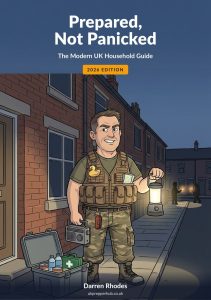
The whole plan, in one book
Prepared, Not Panicked (2026 edition) pulls our guides together into one plan for UK households. PDF, £4.99.
See inside the book →Further Reading: Related Guides
- LoRa Radio Explained
- Off Grid Communications UK
- PMR446 Walkie Talkie Guide
- Satellite Messenger or Personal Locator Beacon?
- Power Bank for Power Cuts
All our guides can be found listed on our resilience hub.
Gear We've Tested & Reviewed
All our reviews can be found on our reviews and resources page.


